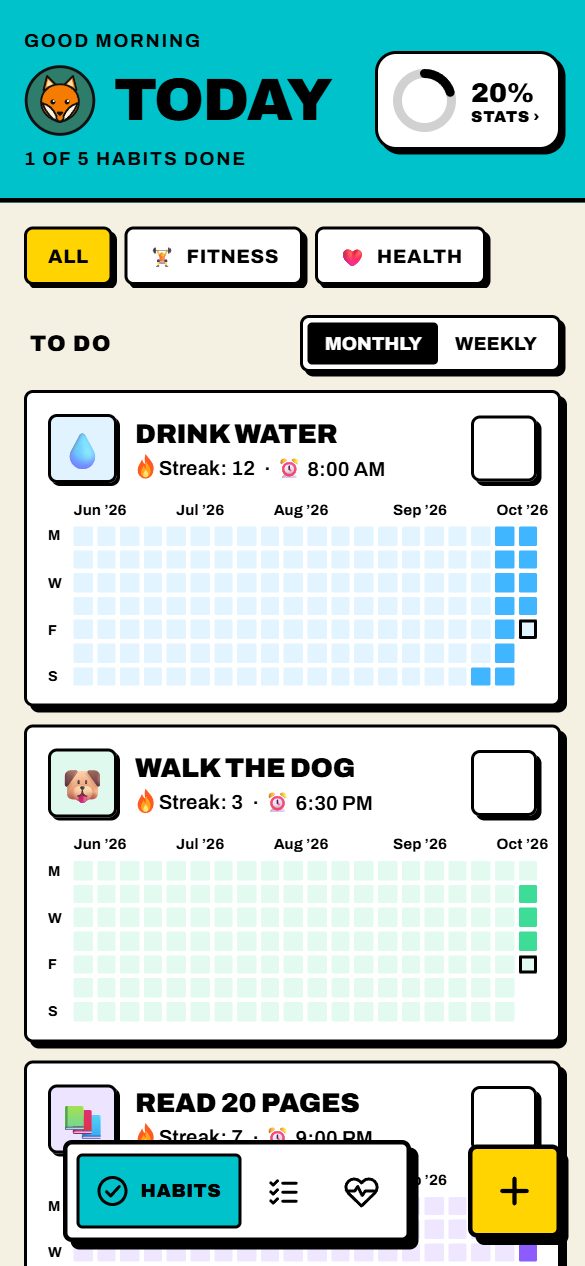
Build habits that last. Torchday puts your habits, your to-do list and your health in one loud, simple Android app. Tick things off, watch your streak catch fire, and see your whole day on your home screen.
Invite onlyFreeWorks offlineSign in with GoogleAndroid 7+
The real app. Pick a theme or an avatar further down and it changes here.
Habits
Daily, weekly or on set dates of the month. Reminders arrive even when the app is closed.
✓
Tick today, see the monthA heat map of every habit, plus a Weekly view of this week at a glance.
⏰
Reminders that fire on timeNotifications even when Torchday is closed.
💪
Gym splitsPlan Mon Chest, Tue Legs. Rest days never break the streak.
🔥
Streaks you can seeYour flame grows with you, all the way to 365 days.
📊
StatsToday's progress on the ring; tap it for the full picture.
Name it. We'll do the rest.
Type a habit and Torchday picks an icon, a colour and a category as you go. Over 300 icons if you'd rather choose.
🚿
Cold shower
Your streak catches fire
Drag to see the flame change as the days add up.
42
Stage
Flickering
13090180365
To-do
Your whole day in time order: habit reminders, timed tasks and the Now line, ticking to the second.
Today's timeline
The red line is the real time where you are. Tick a box to finish something.
Gym · Thursday chest split
Buy groceries 1 / 4
Read · books learning list
Health
Calories with Indian food built in, sleep, and a private cycle tracker. Only what gives you useful insight.
Type what you ate
Like Roti · 2 or Rice · 150 g. Calories, protein, carbs and fat are worked out for you.
0of 1,850 kcal today
Protein0 g
Carbs0 g
Fat0 g
Sleep, last 7 nights
Log when you went to bed and woke up. Tap a night.
Cycle
For women, if you want it. October 2026.
PeriodPredictedFertile windowOvulation
You get a reminder 2 days before your period is due.
Make it yours
Eight looks. Sixteen faces. One widget.
09:41
Thursday 16 October
Themes
Pick a look for Light and one for Dark. Tap one: the real app at the top of the page and the widget change with it.
Light
Dark
Avatars
Sixteen characters drawn for Torchday. Yours sits beside every page title.
Safe to install
Nothing hidden. Nothing sold.
Torchday comes straight from us instead of the Play Store, so Android will ask you to confirm before installing. Here is exactly what the app can and can't do on your phone.
What it asks for, and why
Five permissions. Each one is for a feature you can see.
🔔
NotificationsTo remind you about habits and tasks.
⏰
Alarms and remindersSo a 6:30 reminder arrives at 6:30, not "sometime around then".
🔁
Run at start-upTo set your reminders again after your phone restarts.
🌐
InternetTo sync with your account, if you sign in, and to check for updates.
📦
Install updatesSo Torchday can update itself. Android asks you every time.
What it never touches
Torchday doesn't ask for these, so Android won't let it near them.
📇 Contacts📍 Location📷 Camera🎙️ Microphone🖼️ Photos and files💬 SMS📞 Calls👤 Other accounts
✓
No ads, no trackersNo advertising or analytics code inside the app. Nothing about you is sold.
✓
Every update is signedAndroid only installs an update if it carries the same signature as the version you have, so nobody else can slip in a fake one.
✓
Works without an accountChoose "Continue without an account" and nothing leaves your phone at all.
"Install unknown apps?" Here's why you see it
Android shows this for every app that doesn't come from the Play Store, however safe it is. Tap the link in your invite email, allow it once for your browser, install Torchday, then you can switch it off again. If Play Protect says it hasn't seen the app before, that's because Torchday isn't on the Play Store, not because it found anything wrong. Tap Install anyway.
Your data, locked Coming
Not even we can read it.
Think of your habits as letters in a locked box. Your phone locks the box before it's sent, and only your phones can open it. Here's how, in three steps.
1
Locked on your phone
Before anything is synced, your phone scrambles it with a key that only exists on your phones. Our server stores the scrambled version.
2
The key, split in two
A locked copy of your key sits in a hidden Torchday folder in your own Google Drive. The key that opens it stays with our server. Neither half is any use on its own.
3
Your new phone just works
Sign in with Google and your new phone fetches both halves, opens your key, and unlocks your habits. Nothing to remember, no codes.
See what our server sees
Type anything. Your browser locks it with the same kind of encryption the app will use (AES-256).
On our server
…
Change one letter and the whole thing changes. Without your key, it's just noise.
Who can read your habits?
You, on your phones
Yes
Torchday and our server
No
Google
No
Someone who breaks into our server
No
Someone who gets into your Google account
Could
So keep your Google account safe: turn on 2-Step Verification. If you lose your phone, sign in on a new one and tap Sign out other phones.
Today: your data travels over a secure connection and only your account can open it on our server. End-to-end locking, described above, is coming in a future update. We'll say so in the version history when it's out.
Invite only
Get your invite.
Torchday is shared with a small group for now. Ask for a place, and when you're in, everything works with your Google account.
1
Ask for an invite
Leave your name and the Gmail address you'll sign in with.
2
Get the email
When there's a place, you get an email from Torchday with your download link. Only that Google account can sign in.
3
Install and sign in
Tap the link on your Android phone, install the app, then tap Continue with Google. After that, Torchday updates itself.